Controlling a LeRobot Arm
Learning Objectives
- You can read the positions and limits of the SO101 arm’s joints.
- You can distinguish an absolute destination from a relative change.
- You can give an arm object to a controller and delegate movement to it.
- You can check a complete movement sequence before starting it.
The SO101 is a robot arm supported by LeRobot. These exercises use the Aalto API with a simulated arm; no physical arm or LeRobot installation is needed.
The same controller can use a physical arm
The launcher creates the arm with AaltoRobot.simulated() and initializes it before giving it to your program. The simulator advances a virtual clock during movements.
In a laboratory, the launcher could supply a connected, calibrated physical arm. The same controller methods work with either arm.
Joints and Their Units
The SO101 has five body joints and a gripper. The diagram identifies the body joints:
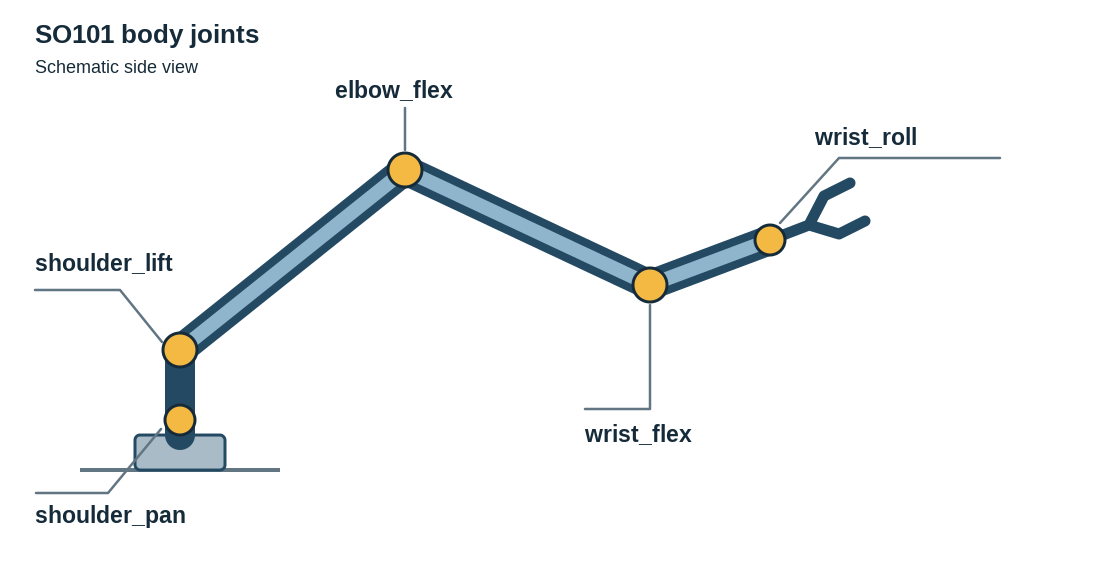
The names used by the API describe the joints’ roles:
| Name | What it controls | Unit |
|---|---|---|
shoulder_pan | Turns the arm around its base | Degrees |
shoulder_lift | Raises or lowers the shoulder | Degrees |
elbow_flex | Bends the elbow | Degrees |
wrist_flex | Bends the wrist | Degrees |
wrist_roll | Turns the wrist | Degrees |
gripper | Opens or closes the fingers | Percent of the allowed opening range |
The body angles are measured from the arm’s calibrated zero positions. A zero angle does not mean that every segment points horizontally. The angles and joint names from the earlier two-joint model cannot be copied directly to this arm.
The Aalto API uses different methods from the earlier two-joint model:
| Earlier two-joint model | Aalto API for the SO101 |
|---|---|
positions() reads a position dictionary | get_positions() reads a position dictionary |
move_to(pose, duration) moves to a two-joint pose | rotate(joint, angle, duration) moves one named body joint |
set_target(...) requests a target; wait(...) advances time | stream_joint(...) takes one paced step toward a target |
The launcher gives your code an initialized arm and handles cleanup afterward. These commands inspect the arm and move one joint:
print(arm.hello())before = arm.get_positions()print(before["wrist_roll"])arm.rotate("wrist_roll", 15, duration=2)print(arm.get_positions()["wrist_roll"])hello() returns a greeting without moving the arm. get_positions() returns a fresh dictionary containing all six values. rotate moves one body joint to an absolute destination: here, 15 degrees. It leaves the other joint destinations unchanged. In the ideal model, the final printed wrist value is 15.0.
Predict the result of calling rotate("wrist_roll", 15) twice. The second call requests the same angle; it does not add another 15 degrees. To make a relative change, first read the current angle and calculate a new destination. Starting at -10 degrees, an increase of 15 degrees gives a destination of 5 degrees.
Joint Names and Units
0 / 5 points
The wrist starts at 5 degrees. Both destinations are within its limits.
arm.rotate("wrist_roll", 15)arm.rotate("wrist_roll", 15)Which statement describes the ideal simulated arm after these calls?
A Controller Receives the Arm
As in the object-composition examples in Part 6, one object can use another object’s methods. Our controller stores the supplied arm:
class ArmController:    def __init__(self, arm):        self.arm = arm
    def turn_wrist(self, angle):        self.arm.rotate("wrist_roll", angle)        return self.arm.get_positions()
A caller can create controller = ArmController(arm) and call controller.turn_wrist(12). Inside turn_wrist, self refers to the controller. self.arm refers to the arm, which performs the movement. The controller does not create another arm or initialize the supplied one.
Run main.py. Change the wrist destination and compare the final readings. Edit main.py; the supporting API files are provided.
The example calls finish() to return the arm to the position saved during initialization.
get_limits() returns a dictionary whose values are two-item lists. Ordinary indexing gives both boundaries:
limits = arm.get_limits()["wrist_roll"]print(limits[0])print(limits[1])Both endpoints are allowed. Read the supplied limits rather than placing fixed numbers in controller methods: an exercise or a physical setup can use a narrower range. Position and limit records are copies. Editing a returned record does not move the arm or change its guards.
The next exercise supplies the constructor and a body_limits(arm, joint) helper. The helper checks the joint name and returns its boundary list. Add a method that calculates a relative destination and checks it before requesting a movement. A rejected operation should leave the arm unchanged.
Relative Rotation
0 / 25 points
Complete rotate_by(self, joint, degrees) in main.py. Rotate the named body joint by degrees from its current position. Positive and negative changes are possible. Return a fresh dictionary of all positions after the movement.
Use body_limits(self.arm, joint) to obtain the allowed minimum and maximum. The helper raises ValueError for an unknown joint or the gripper. If the calculated destination falls outside these inclusive boundaries, raise ValueError before any movement. Otherwise, move only the named joint. Do not call finish.
The supplied change is a finite number. Run python check.py to check your method without an arm or LeRobot.
When Does a Call Finish?
rotate and finish complete their movements before the next statement runs. Calls execute in order. The API may lengthen a requested duration to stay within its configured speed. The simulator applies these speed limits too.
Check a Sequence Before Moving
A list can describe a prepared movement. Each record names one joint, its absolute destination, and a duration in seconds. Replace program(arm) in the editor above with this example:
def program(arm): moves = [ {"joint": "wrist_roll", "angle": 15, "seconds": 1}, {"joint": "wrist_roll", "angle": -15, "seconds": 1}, {"joint": "wrist_roll", "angle": 0, "seconds": 1} ] for move in moves: arm.rotate(move["joint"], move["angle"], duration=move["seconds"]) print(arm.get_positions()[move["joint"]]) arm.finish()The loop passes each record’s seconds value as the movement’s duration. Each call completes before the position is printed:
15.0-15.00.0Change the middle angle to -5 and run the program again. The loop runs the list once; repeating the list produces a wave. After the loop, finish() returns the arm to its initial position.
Suppose the last record has an out-of-range angle. Checking each record immediately before executing it would discover the problem only after earlier movements had happened. Instead, use one loop to check the whole list and another to execute it. The supplied check_move(arm, move) helper checks one record without moving the arm. It raises ValueError when the record is unsuitable.
In the following exercise, implement play_sequence(moves, repeats). Keep the supplied records unchanged. Zero repetitions or an empty list require no movements, but the method still returns a fresh position dictionary. play_sequence leaves the arm at its final destination; the caller decides when to call finish().
Prepared Movements
0 / 35 points
Complete play_sequence(self, moves, repeats) in main.py. Each movement record contains "joint", "angle" and "seconds". Visit the absolute angles in list order, using each duration. Repeat the complete sequence repeats times and return a fresh dictionary of all final positions. Do not call finish.
Before any movement, pass every record to check_move(self.arm, move). This supplied helper raises ValueError for an invalid joint, angle or duration (greater than zero and at most 60 seconds). Thus an invalid later record must prevent the entire sequence from starting. Keep the supplied records unchanged.
repeats is a nonnegative integer. Empty sequences and zero repetitions cause no movements, but still check all supplied records. Run python check.py to check your method without hardware.
Check when a movement finishes and what happens to a saved position record when the arm returns to its initial pose.
When a Movement Finishes
0 / 5 points
The launcher initialized the simulated wrist at 5 degrees. The destination is within its limits.
arm.rotate("wrist_roll", 20)after = arm.get_positions()arm.finish()Which statement describes the calls and the saved record?
Check Your Understanding
- Why do two calls to
rotate("wrist_roll", 15)not add up to a 30-degree rotation? - What object does
selfrefer to inside a controller method? What doesself.armrefer to? - Why check every movement record before executing the first one?
- When does the next statement run after
rotateorfinish, and who handles cleanup afterward?
Optional: a continuously changing target
The previous chapter calculated a repeating target and sent it to the arm in small steps. The Aalto API supports this with stream_joint(joint, angle). Each call takes one paced step toward an absolute angle. A distant target may not be reached in that step. The method handles the update interval, so the loop needs no extra wait or sleep.
Run the supplied main.py below. It uses the wave_position helper for one four-second wrist cycle, after checking both extreme targets. Amplitude has the same meaning as before: targets range from center - amplitude to center + amplitude.
Each row shows a scheduled elapsed time, a requested target, and a measured position. Compare the target and the reading at different parts of the cycle.
The loop calculates scheduled elapsed time as the step number multiplied by control_period, the interval used by each streaming call. That is different from reading a clock as in the previous chapter. Execution on a physical arm can take longer than the schedule.
The program calls finish() explicitly after the cycle. Ending the loop alone does not request a return to the initial position.