Routing and Dynamic Pages
Learning Objectives
- You know of SvelteKit’s file-based routing.
- You know how to create routes with dynamic parameters and you know how to access the parameters.
- You know of some curveballs that relate to dynamic parameters.
Routing and SvelteKit
Svelte has a framework SvelteKit, which is actually what we’ve been using. SvelteKit is a framework for building web applications with Svelte.
SvelteKit uses file-based routing, where files and folders in the src/routes folder define the routes of the client-side application. As we know, a path /books would correspond to a +page.svelte file in the folder src/routes/books.
Here, we’ll work a bit on dynamic routes. Work on the examples in the walking skeleton. As a starting point, create the folder books into src/routes, and then create a file called +page.svelte in the folder src/routes/books. Place the following content to the file.
<p>books!</p>Now, when you navigate to the path /books in the application, you should see the text “books!”.
Routes with dynamic parameters
Routes with dynamic parameters are defined by creating a folder where the name is enclosed in square brackets, such as [bookId]. The name inside the brackets is used as the name of the parameter (we’ll look into using the parameter in a moment).
To try this out, create a folder called [bookId] in the src/routes/books folder. In this folder, create a file called +page.svelte, and place the following content to the file.
<p>one book!</p>Now, when you open up the application and navigate to the path /books/1, you should see the text “one book!”. Similarly, when you access the path /books/5, you should see the text “one book!”.
Dynamic todo pages
0 / 10 points
The assignment template comes with three files placed in folders as follows:
routes/todos/[todoId]/+page.svelteroutes/todos/+page.svelteroutes/+page.svelteModify the files so that the application responds to requests as follows.
- When accessing the path “/todos”, the user is shown the text “Todos!”.
- When accessing the path “/todos/1”, “/todos/2”, or any other number followed by “/todos”, the user is shown the text “One todo!”.
There is no need for navigation or similar; we are only interested in the pages and the paths.
Accessing dynamic parameters
To access dynamic parameters from the route in the +page.svelte file, we need to import information about the page from SvelteKit’s $app/state module. The page object contains information about the current page, including the parameters.
Update the src/routes/books/[bookId]/+page.svelte file to match the following.
<script>  import { page } from "$app/state";</script>
<p>book {page.params.bookId}</p>
The updated +page.svelte file uses dynamic parameters through the params property of the page object. The property bookId corresponds to the folder name [bookId].
Now, when you access the path /books/1, you should see the text “book 1”. Similarly, when you access the path /books/5, you should see the text “book 5”, and so on.
Showing todo numbers
0 / 10 points
The assignment template comes with a solution to the exercise “Dynamic todo pages”.
Modify the application so that when the user accesses the path “/todos/1”, “/todos/2”, or any other number followed by “/todos/”, the user is shown the text “Todo 1”, “Todo 2”, or any other number, respectively. The number should be taken from the path and displayed on the page.
Slight curveballs
There are a few curveballs that relate to dynamic parameters that are good to be aware of.
Components are not recreated when navigating
When navigating to a different route, components are not recreated. Instead, the component is updated with new properties. This can lead to unexpected behavior if you create variables based on the properties, as the variables will not be updated when the properties change.
To try this out, modify the src/routes/books/[bookId]/+page.svelte file to match the following.
<script>  import { page } from "$app/state";  let bookId = parseInt(page.params.bookId);  let nextBookId = bookId + 1;</script>
<p>book {page.params.bookId}</p>
<p>Current book id: {bookId}</p><p>Next book id: {nextBookId}</p>
<p><a href="/books/{nextBookId}">Next book</a></p>
When you open up the page in a browser and navigate to the path /books/1, you should see the text “book 1”, “Current book id: 1”, and “Next book id: 2”. However, when you click the “Next book” link, you are taken to the path /books/2, but the texts are still “Current book id: 1”, and “Next book id: 2”.
The only text that changes is the “book {bookId}” text, which is updated because it directly uses the
page.params.bookIdproperty.
There are two ways to fix this. One, we can use the data directly without creating new variables.
<script>  import { page } from "$app/state";</script>
<p>book {page.params.bookId}</p>
<p>Current book id: {page.params.bookId}</p><p>Next book id: {parseInt(page.params.bookId) + 1}</p>
<p><a href="/books/{parseInt(page.params.bookId) + 1}">Next book</a></p>
And two, we can use a $derived rune to create variable that keeps track of changes to the property and updates the variable value whenever the value of the property changes.
<script>  import { page } from "$app/state";  let bookId = $derived(parseInt(page.params.bookId));</script>
<p>book {bookId}</p>
<p>Current book id: {bookId}</p><p>Next book id: {bookId + 1}</p>
<p><a href="/books/{bookId + 1}">Next book</a></p>
We’ll look into runes in more detail later in the course.
Dynamic Parameters Curveball
0 / 5 points
Suppose you navigate to the path /books/3 and have the following content in your Svelte component:
<script>  import { page } from "$app/state";  let nextBookId = parseInt(page.params.bookId) + 1;</script>
<p>book {page.params.bookId}</p><a href="/books/{nextBookId}">Next book</a>
Now, when you click the “Next book” link twice, what will the path in the browser’s address bar be?
When using parseInt on a value that is not a number, the result is NaN (not a number). For example, if you access the path /books/abc, the value of parseInt(page.params.bookId) is NaN.
This can lead to unexpected behavior when performing arithmetic operations with NaN, as any operation with NaN results in NaN.
Parameters and string comparison
Dynamic parameters are strings which can lead to unexpected behavior when comparing the parameters to other data types, such as numbers.
To try this out, modify the src/routes/books/[bookId]/+page.svelte file to the following.
<script>  import { page } from "$app/state";</script>
<p>book {page.params.bookId}</p>
{#if page.params.bookId === 1}  <p>book id is number 1</p>{:else}  <p>book id is not number 1</p>{/if}
When you access the path /books/1, you will see the text “book 1” and “book id is not number 1”. This is because the dynamic parameter is a string, and the comparison page.params.bookId === 1 compares a string to a number, which will always return false.
If you need to work with other data types, such as numbers, you can convert the string to the desired data type. The following example uses parseInt to turn the book id to a number before the comparison.
<script>  import { page } from "$app/state";  let bookId = $derived(parseInt(page.params.bookId));</script>
<p>book {bookId}</p>
{#if bookId === 1}  <p>book id is number 1</p>{:else}  <p>book id is not number 1</p>{/if}
Now, when you again access the path /books/1, you should see the text “book 1” and “book id is number 1”.
Navigating todos
0 / 10 points
The assignment template comes with a solution to the exercise “Showing todo numbers”. Modify the application as follows:
- The page at the root path (”/”) should contain a link to the todo list page (“/todos”) with the text “Go to todo list”.
- The todo list page (“/todos”) should contain a link to the todo page “/todos/1” with the text “Go to todo 1”.
- Individual todo pages (e.g. “/todos/1”) should contain a link to the next todo page (e.g. “/todos/2”) with the text “Go to next todo”.
Implement the links using the
<a>HTML element.
Multiple dynamic parameters
A path can have multiple dynamic parameters, such as /books/1/chapters/2. To try this out, create a folder chapters in the folder src/routes/books/[bookId], and place a folder [chapterId] in it.
In the folder src/routes/books/[bookId]/chapters/[chapterId], create a file called +page.svelte, and place the following code to the file.
<script>  import { page } from "$app/state";</script>
<p>book {page.params.bookId}, chapter {page.params.chapterId}</p>
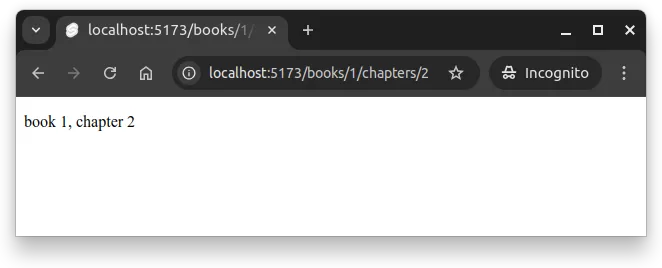
Now, when you access the path /books/1/chapters/2, you should see the text “book 1, chapter 2”. Similarly, when you access the path /books/5/chapters/3, you should see the text “book 5, chapter 3”. This is shown in Figure 1 below.
Interpreting Dynamic Parameters
0 / 5 points
Suppose you navigate to the path /books/1/chapters/2 in the above example, but have a following content in your Svelte component:
<script>  import { page } from "$app/state";</script>
<p>book {page.params.bookId}, chapter {page.params.chapterId}</p>
{#if page.params.chapterId === 2}  <p>Chapter is number 2</p>{:else}  <p>Chapter is not number 2</p>{/if}
What the conditional rendering show on the page?
Summary
To summarize:
- SvelteKit uses file-based routing, where files and folders in the
src/routesfolder define the routes of the client-side application. - Routes with dynamic parameters are defined by creating a folder where the name is enclosed in square brackets, such as
[bookId]. - The name inside the brackets is used as the name of the parameter.
- The dynamic parameters can be accessed in the
+page.sveltefile by importing thepageobject from the$app/statemodule and using theparamsproperty of thepageobject. - When navigating to a different route, components are not recreated. Instead, the component is updated with new properties. This can lead to unexpected behavior if you create variables based on the properties, as the variables will not be updated when the properties change.
- Dynamic parameters are always strings. If you need to work with other data types, you can convert the string to the desired data type, such as using
parseIntto convert a string to a number.
Nested todos and tasks
0 / 20 points
Working locally on your walking skeleton, create a small set of SvelteKit pages that demonstrate file-based routing with multiple dynamic parameters. The expected pages are as follows:
/: a landing page for the application./todos: a landing page for todos./todos/[todoId]: a page for a single todo (with a dynamic todoId)./todos/[todoId]/tasks/[taskId]: a page for a single task (with dynamic todoId and taskId). The file structure (undersrc) should be as follows:
.└── routes ├── todos │ ├── [todoId] │ │ ├── tasks │ │ │ └── [taskId] │ │ │ └── +page.svelte │ │ └── +page.svelte │ └── +page.svelte └── +page.svelteImplement the individual pages as follows:
/- Has a main heading with text “Welcome!”.
- Has a link to /todos with the text “Go to Todos”.
/todos- Has a main heading with text “Todos”.
- Has a link to /todos/1 with text “Open todo 1”.
- Has a link to to /todos/1/tasks/1 with text “Open todo 1, task 1”.
/todos/[todoId]- Has a main heading with text “Todo {todoId}”, where {todoId} corresponds to the value of [todoId] from the path.
- Has a link to the first task of the todo with the text “Go to first task”. For example, if the current page is /todos/1, the link should point to /todos/1/tasks/1.
- Has a link to the next todo page (e.g. if the current page is /todos/1, the link should point to /todos/2) with text “Go to next todo”.
/todos/[todoId]/tasks/[taskId]- Has a main heading with text “Todo {todoId}, task {taskId}”, where {todoId} and {taskId} correspond to the values of [todoId] and [taskId] from the path.
- Has a link back to the parent todo page with text “Back to todo”.
Once ready, zip the contents of the folder client/src and return the zip here. The zip should not contain the client/src folder, but the contents of the client/src folder.